Loyalty and promotions
Reward regulars with points and tiers — no app download required.
Loyalty is built around the customer's phone number. Customers earn points on every order and spend them for discounts. Points and balance print on every receipt. No app download needed.
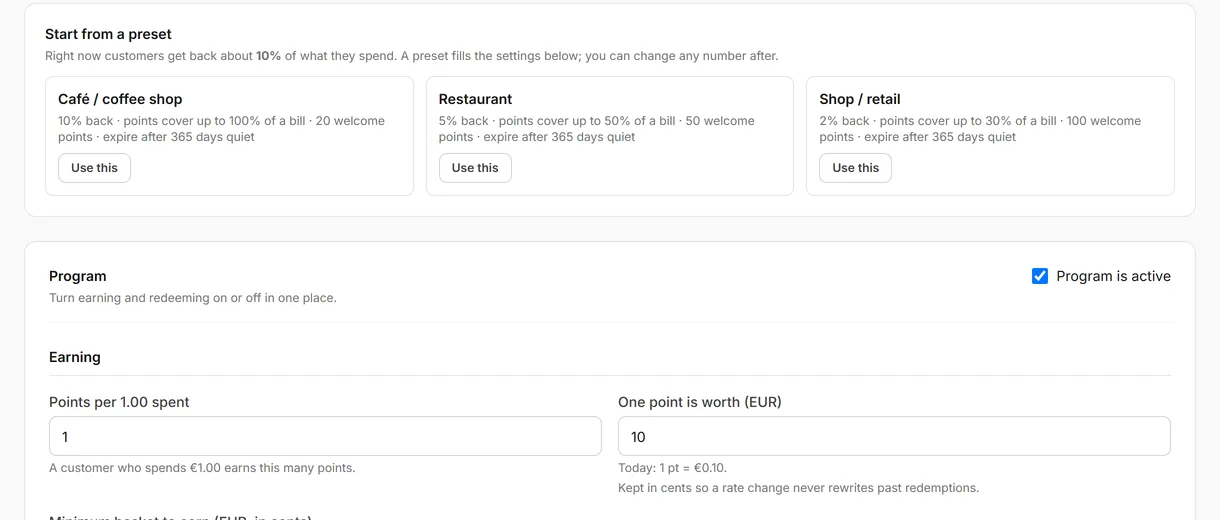
1. Turn on loyalty
- Settings → Loyalty → Loyalty enabled → On.
- Set Points per unit spent (e.g. 1 point per €1).
- Set Redemption value (e.g. 100 points = €1 off).
- Set Points expiry (optional — e.g. expire after 12 months).
- Save.
2. Add tiers (optional)
Tiers reward customers who hit spending milestones — Silver, Gold, Platinum.
- Settings → Loyalty → Tiers → Add tier.
- Name, points threshold, colour, optional benefit (e.g. 1.5× points multiplier).
- Save.
3. Enable visit SMS (optional)
Send an SMS after each visit with the customer's points balance.
- Settings → Loyalty → Send visit SMS → On.
- Save.
Requires an SMS credit balance. Add credits at Settings → SMS wallet.
4. How customers join
- The cashier enters the customer's phone number at checkout on the POS.
- If new, a loyalty account is created automatically.
- The receipt shows points earned, total balance and your website URL.
- Customers can also sign up from your customer website.
5. Redeeming points
- At checkout, enter the customer's phone number on the POS.
- If they have enough points, a Redeem points button appears.
- Tap it — Qavyo deducts the points and applies the discount automatically.
To help customers link their in-store account to the website, generate a one-time sign-in code from the POS: Customer → Generate sign-in code.
What's next
Email and SMS marketing → — automated messages for birthdays, win-back and VIP customers.